

What this is about
Anyone who sends an enquiry through a contact form usually has to wait. The message lands in an inbox, someone has to read it, sort it and write a suitable reply. At best that takes hours, often days.
For my own enquiries I have automated this step with n8n and AI. This post shows how the system works and where its limits are. It is my own system, not an installation at a client; that is why there are no figures on savings at clients.
Why response time matters
A Harvard Business Review study from 2011 found that companies that got back to an enquiry within an hour were nearly seven times as likely to reach a decision maker as companies that responded just an hour later. Companies that responded within 30 days at all took 42 hours on average. The study looked at human follow-up, not automated emails; it only shows how much a fast first contact is worth.
What if the reply came within moments and was still personal?
How it works
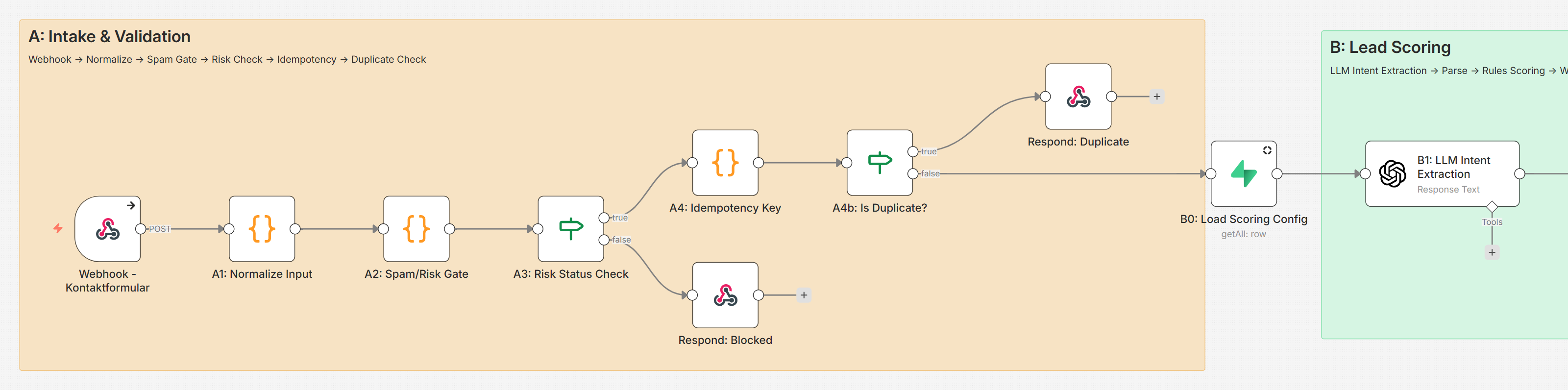
The system consists of these parts:
- n8n runs the process. I host it myself on a server in Germany.
- OpenAI (gpt-4o-mini and gpt-4o) recognises the request and writes the reply.
- A website fetch reads the sender's website: title, description, headings.
- Resend sends the emails.
- Supabase stores the state of the enquiries it handles.
- Microsoft Graph provides free slots from my Outlook calendar.
Step by step
- A webhook receives the enquiry: name, email address, website and a description of the project.
- Fixed rules filter, without AI: suspicious enquiries and duplicate submissions go no further.
- The system fetches the sender's website and works out what the company does.
- Three separate AI calls: recognise the request, understand the company's business, write the reply.
- The reply goes out as a designed email, for suitable enquiries with suggested times from my calendar.
- The enquiry is stored, with its rating and all details.
All of this runs without anyone stepping in; the reply is on its way before anyone would have opened the inbox.
What the AI does differently
The point is not that an AI writes the text, but what it knows beforehand:
- what the company offers and to whom,
- which industry it works in,
- what the person asking actually wants.
The result is not a generic "we offer automation" email, but one that shows: I have understood what you do, and this is how I could help you.
Structure
The system consists of five n8n workflows:
- Main process: intake, checks, AI and sending.
- Appointment handling: confirm, rebook and cancel via a link; the calendar is connected through Microsoft Graph.
- Expiry and reminders: suggested times are held in the calendar. Anyone who does not confirm gets a reminder; after that the system releases the slot again.
- Recognising replies: appointment confirmations in incoming emails are matched.
- Website analysis as a playground: a simplified version to try out.
Tone as a setting
I can set the tone of the reply: matter-of-fact, casual in a start-up style or, for testing, as a pirate. The process stays the same, only the wording changes.
Try it yourself
A simplified version is available as a demo: you enter a website, the system reads it and writes a short assessment or the reply to an enquiry. It runs without n8n, but shows the core: a reply that responds to the sender's website. The result appears only on the page; no email goes out.
Limits
- The reply does not replace a conversation. It is a quick first step with a suggested time; whether an enquiry is a good fit, I find out in the call.
- The AI can be wrong, for example with very short enquiries or websites with little text. That is why it only writes the first reply; everything after that goes across my desk.
Conclusion
A fast, personal reply does not need a large apparatus. With n8n running the process and an AI that knows the context, the first step of an enquiry can be handled without any waiting.